You are currently on our US Store.
Switch to the EU Store to enjoy:
🎁 10% OFF your first order
⚡ Faster local shipping & EUR pricing
P
Reason 1: The source file may not have been created with the ideal quality.
Solution: Print the sample label to test if your printer is working well.
If the sample label is good, check the file quality.
Reason 2: High print speed or density.
Solution: Try reducing your print speed (try 3 in/sec) and density (try 3 as well) to see if you get a better result.
For Mac
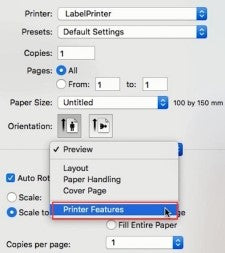
①Select "Printer Features" in "Preview"
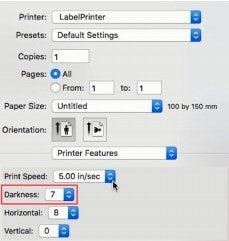
②Set the print density in "Darkness"
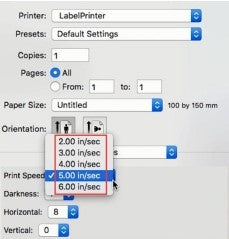
③Set the print speed in "Print Speed"
For Windows
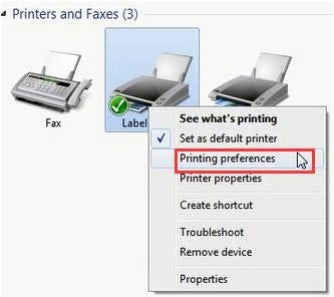
①Open “Devices and Printers” -> right click on “Label Printer” - > choose “Printer Preferences” -> click “Advanced”
②Set the print speed in "Speed"
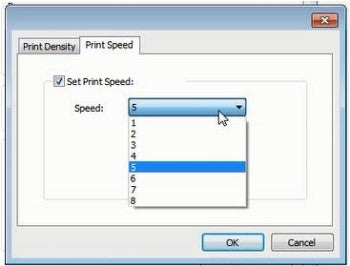
③Set the print density in "Density"
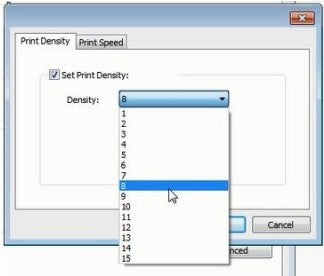
Bestsellers Labels For Business Labels Printer
$15.99
$15.99
$12.99
$12.79
From materials to transport, we’re working to reduce our carbon footprint to near zero.
Carbonfree Certified
About
About
Subscribe to our newsletter
Get an Exclusive 10% Off Your First Purchase
Dear Member, Your Exclusive Free Shipping Is Ready.
Shop with Confidence at Phomemo
PHOMEMO
Sign In to Receive 10% Off
Sign up now and receive a gift
with your first order!
You can sign up to receive notifications
via email and unsubscribe at any time.
You are currently on our US Store.
Switch to the EU Store to enjoy:
🎁 10% OFF your first order
⚡ Faster local shipping & EUR pricing
We use cookies to ensure the best experience on our website and assist with our marketing efforts. By continuing to browse, you agree to our cookie policy.
Decline All