You are currently on our US Store.
Switch to the EU Store to enjoy:
🎁 10% OFF your first order
⚡ Faster local shipping & EUR pricing
P
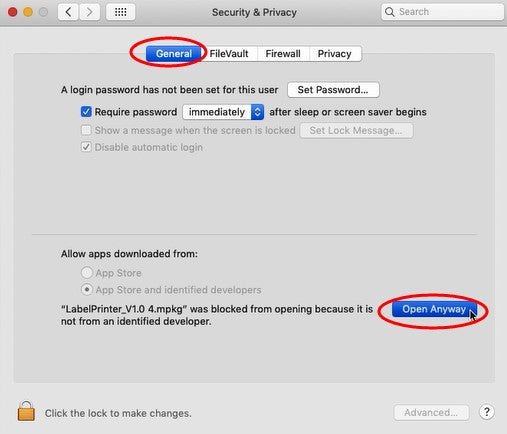
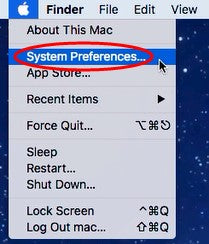
1.Haga clic en “
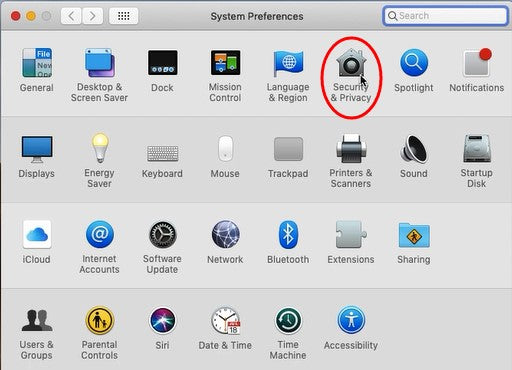
” y vaya a “Preferencias del Sistema” -> seleccione “Seguridad y privacidad”
2.En la pestaña “General”, haga clic en “Abrir de todos modos” para configurar

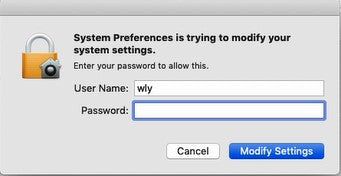
3.Introduzca la “Contraseña” de su Mac. Luego haga clic en “Modificar ajustes”.
NOTA: Si su Mac no tiene contraseña, haga clic en “Modificar ajustes”.

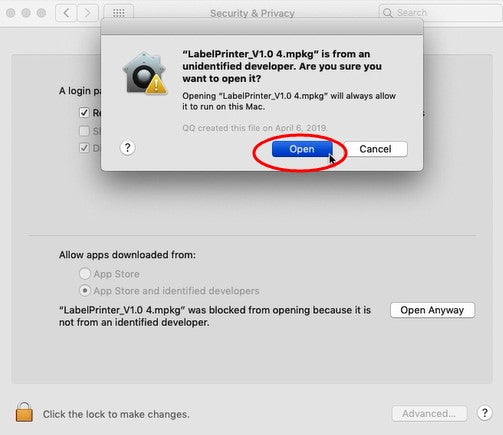
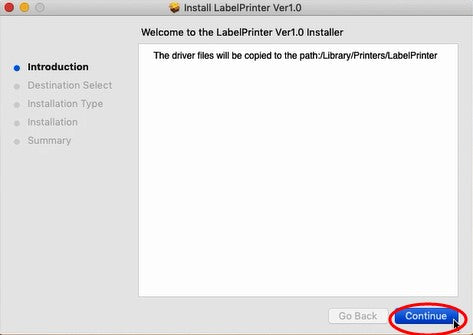
4.Haga clic en “Abrir”, luego podrá continuar con la instalación del controlador.
ATENCIÓN: Antes de la instalación, asegúrese de que la impresora esté conectada y encendida.


Bestsellers Labels For Business Labels Printer
$15.99
$15.99
$12.99
$12.79
Phomemo Japan 株式会社
〒105-0012
東京都港区芝大門1丁目2番14号
Dear Member, Your Exclusive Free Shipping Is Ready.
Shop with Confidence at Phomemo
PHOMEMO
初回限定 15% OFF
いますぐログインしてクーポンを受け取りましょう。
メ-ルで通知を受け取るように登録でき、いつでも登録を解除できます。
You are currently on our US Store.
Switch to the EU Store to enjoy:
🎁 10% OFF your first order
⚡ Faster local shipping & EUR pricing
We use cookies to ensure the best experience on our website and assist with our marketing efforts. By continuing to browse, you agree to our cookie policy.
Decline All