Razón 1: El archivo fuente puede no haber sido creado con la calidad ideal.
Solución: Imprima la etiqueta de muestra para probar si su impresora está funcionando bien.
Si la etiqueta de muestra está bien, verifique la calidad del archivo.
Razón 2: Alta velocidad o densidad de impresión.
Solución: Intente reducir la velocidad de impresión (pruebe 3 in/sec) y la densidad (pruebe también 3) para ver si obtiene un mejor resultado.
Para Mac
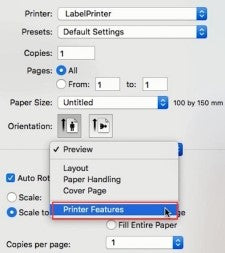
①Seleccione "Características de la impresora" en "Vista previa"
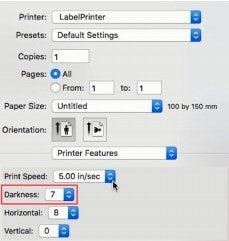
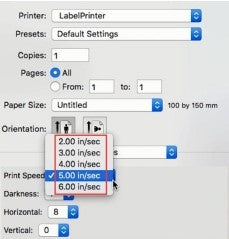
②Configure la densidad de impresión en "Oscuridad"③Configure la velocidad de impresión en "Velocidad de impresión"
Para
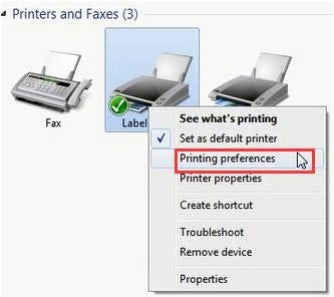
Windows ①Abra “Dispositivos e impresoras” -> haga clic derecho en “Impresora de etiquetas” -> elija “Preferencias de impresora” -> haga clic en “Avanzado”
②
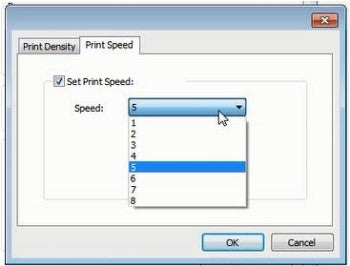
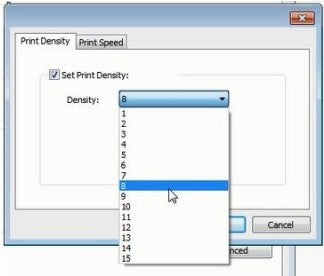
Configurela velocidad de impresión en "Velocidad" ③Configure la densidad de impresión en "Densidad"
③Establece la densidad de impresión en "Density"


 CA
CA
 EU
EU